LeadHub CRM is a complete customer relationship management platform. In this article, we focus on its social media tools and how they keep your business visible without posting every day.
You know your business should be on social media. The trouble is finding the time, so posting falls to whoever’s free. And before you know it, three weeks have gone by without a single post.
Social media management shouldn’t mean logging into Facebook, Instagram, and Google every single day. There’s an easier way: plan your posts once, schedule them ahead, and stay in front of the people you want to reach.
Inconsistent Social Media Is Hurting Your Visibility
When your pages go quiet, people notice. Think about a church group comparing retreat centers or a parent picking a summer camp. If your last post is from months ago, they might wonder whether you’re still open.
And your customers really are paying attention. According to the 2025 Sprout Social Index, nine in 10 consumers use social media to keep up with trends and cultural moments.
Ignoring messages hurts too. In Sprout Social’s 2025 survey of UK consumers, 71% said they’d buy from a competitor if a brand didn’t answer their customer service questions.
Every quiet week costs you inquiries from people who are already interested. You don’t need more marketing. You just need an easier way to show up.
How LeadHub Simplifies Social Media Management
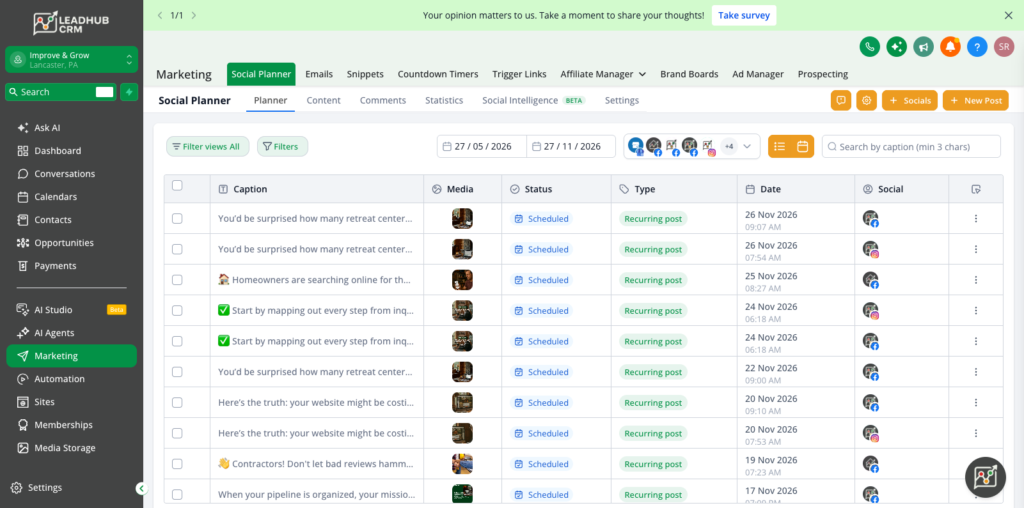
LeadHub puts social media management in the same place you already handle leads and follow-up. You can create and schedule posts for all your social profiles from one dashboard, so you plan once and everything goes out on time.
Facebook, Instagram, LinkedIn, TikTok, and your Google Business Profile all sit on one calendar. You’ll know what’s going out, when, and where, without hopping between apps.
Key Features and Benefits
Posting is the easy part. Staying consistent without giving up hours every week is the hard part, and that’s where these features help.
A Shared Content Calendar
Draft, schedule, and review posts for every connected account in one spot. You’ll see your whole month at a glance and catch gaps before they turn into quiet weeks.
Scheduling That Runs Without You
Line up posts weeks in advance, set some to repeat, and keep your evergreen content rotating in a queue. Your pages stay active through your busiest season, even when nobody has a spare minute.
AI-Assisted Drafting
Answer a few quick questions about your goal, audience, and call to action, and LeadHub’s AI writes a first draft in your brand voice. No more staring at a blank screen, and you can tweak the draft until it sounds just like you.
Custom Posts for Each Channel
Adjust captions and images for each platform, then preview how every post will look before it goes live. If an account gets disconnected, you’ll get an alert, so scheduled posts don’t silently fail.
Mobile Posting and Team Approvals
Create, schedule, and publish right from the LeadHub mobile app, and send drafts for approval before they go out. Your team can keep things moving without waiting on one person at a desk.
Google Business Profile Posts
Share updates on your Google Business Profile right alongside your other channels. People searching nearby see what’s new at your camp, and you don’t need another login to keep your listing fresh.
Practical Example: How a Retreat Center Keeps Its Social Media Consistent
Picture a Christian retreat center where the program director squeezes in social media between everything else. Posts go up when she can get to them, the Facebook page goes quiet for weeks before summer registration, and Google still shows last year’s events.
With LeadHub CRM, she could spend one afternoon a month planning content instead of scrambling every week. Here’s what that might look like:
- AI-assisted drafts could turn her event list into ready-to-edit posts that sound like the camp
- The content calendar could line up a full month of posts on Facebook, Instagram, and Google
- Recurring and evergreen posts could keep registration reminders and photo highlights coming without extra work
- Performance reports could show which posts get the most comments and reach
Families and church groups would see a lively, up-to-date camp every time they looked. And since LeadHub also captures leads from social messages, staff could reply fast while the director gets her time back for guests.
Measure What’s Working with Social Media Analytics
Posting every week is a great start, but it’s only half the picture. You also want to know which posts people actually stop for, and LeadHub’s social media analytics tell you without making you log into every platform.
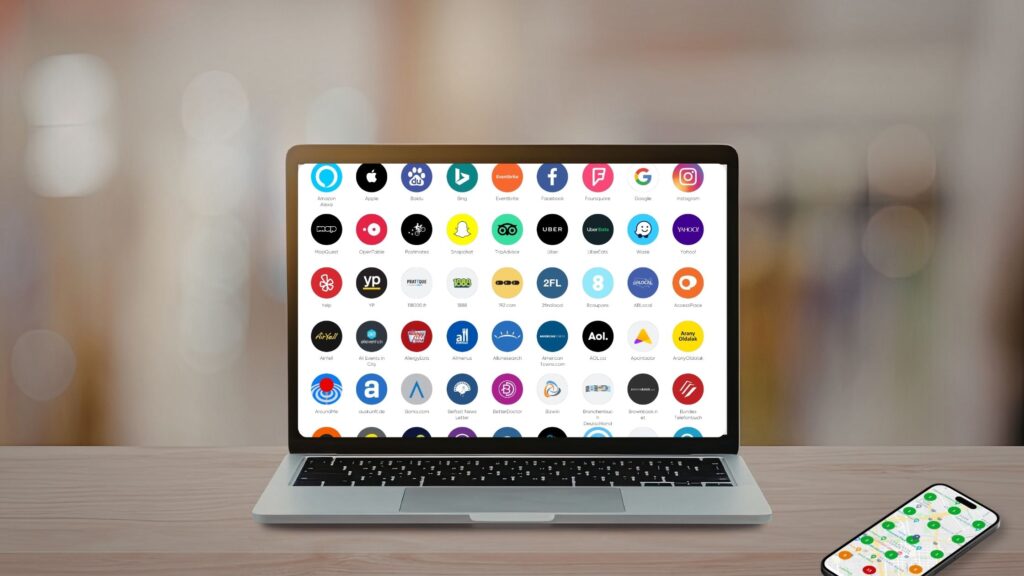
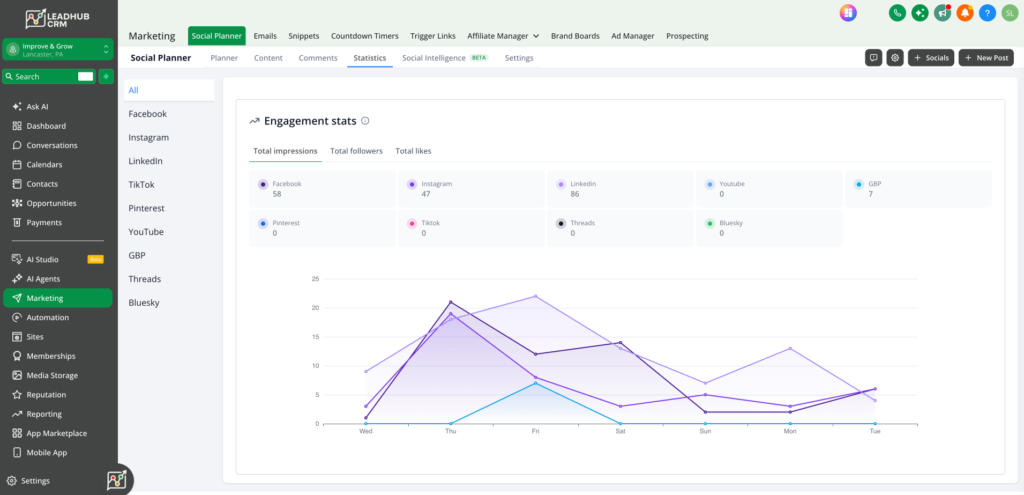
Your connected profiles show up together in one dashboard. You’ll see followers, likes, comments, impressions and how many posts went out, either across all your accounts or for just Facebook, Instagram or LinkedIn.
Engagement, impressions and reach are compared with the week before, so it’s easy to tell whether your latest posts landed. There’s also a top posts report that ranks your most-liked posts, which is a handy hint about what your audience wants more of.
We manage Improve & Grow’s own social profiles in LeadHub, so this is the same dashboard our team regularly checks. Here’s what it looks like.
When Social Media Management Becomes Consistent, Visibility Follows
You don’t have to post every hour to stay on your audience’s radar. You just need a steady rhythm that keeps your business visible, trustworthy, and easy to find when people are ready to book.
LeadHub CRM gives you that rhythm without piling more onto your plate. Plan ahead, post everywhere at once, and spend your energy on the customers your social media brings through the door.
Simplify Your Social Media with LeadHub CRM
If social media keeps sliding to the bottom of your to-do list, LeadHub can take it off your hands. Let’s chat about how it could keep your profiles busy and your calendar full.
FAQs
What is social media management?
It’s planning, creating, scheduling, and publishing posts across your social profiles, then keeping an eye on how they perform. It also means answering comments and messages so people feel heard.
Why is managing social media important for small businesses?
Lots of customers check a business’s social pages before they reach out. A current, well-kept profile builds trust, keeps you top of mind, and gives people an easy way to get in touch.
How does social media scheduling work?
You write your posts ahead of time, pick the platforms and dates, and the system publishes them for you. In LeadHub, you can schedule one post, set up repeating ones, or plan out a whole month at once.
How often should a business post on social media?
Being consistent matters more than posting a lot. For most small businesses, a few good posts a week on each main platform is a pace you can actually keep, especially when you schedule ahead for busy seasons.
Can LeadHub manage all my social media accounts in one place?
Yes. Connect your main social profiles and your Google Business Profile, then plan and publish everything from one dashboard. Social media tools come with the LeadHub Pro plan, and our team can help you get set up.