
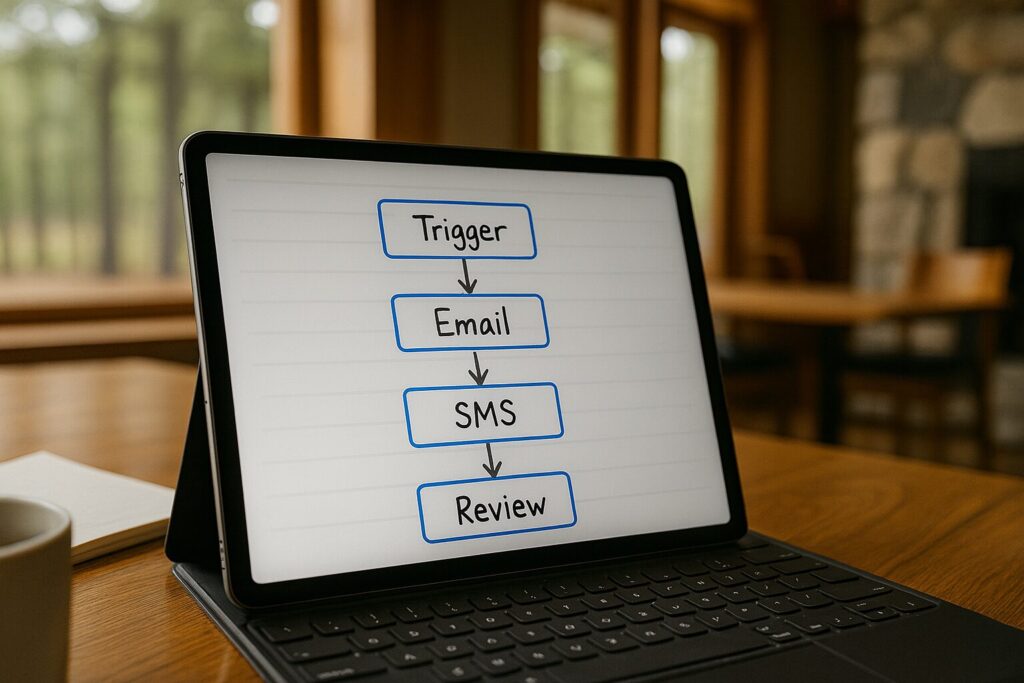
LeadHub CRM is a complete customer relationship management platform. In this article, we focus specifically on its Automated Workflows feature and how it helps businesses respond to every lead consistently.
Running a business by hand catches up with every team eventually. Follow-up emails get written one at a time, reminder texts get typed out manually, and tasks pile up faster than anyone can track them. Automated workflows solve that by letting the system handle the repetitive work instead.
LeadHub CRM lets you build a sequence once and let it run in the background from that point forward. Instead of a team member remembering every follow-up, the workflow remembers on its own and sends the right message at the right time.
This article looks at how LeadHub’s Automated Workflows feature keeps every lead moving through your pipeline. You will see how the system handles email, text, and internal tasks together, without adding a single item to anyone’s to-do list.
Manual Follow-Up Is Killing Your Growth
Most camps don’t lack interest from groups. What they lack is a system that keeps each inquiry moving when the office gets busy. A retreat request sits in an inbox for two days. A youth pastor misses a scheduled call and never gets a text to reschedule. A new inquiry gets one email, then silence, because nobody planned what should happen next.
The result? Groups go cold, and your staff spends hours on tasks a workflow could handle.
Timing drives most of the cost. A Harvard Business Review study found that businesses that contacted a lead within an hour were nearly seven times more likely to qualify that lead than those that waited even one hour longer.
Say a typical group booking is worth $5,000 to $10,000. Losing just two of those groups a month to slow or missing follow-up could mean $120,000 to $240,000 in lost annual revenue, money that funds your mission. That isn’t a staffing problem. It’s a workflow problem.
Introducing LeadHub’s Automated Workflows
LeadHub brings marketing, sales communication, and pipeline management into one CRM system. Its Automated Workflows feature lets you chain together emails, texts, and internal actions that start on their own based on what a group does.
No one has to remember to send the next message. Every inquiry gets a response, even in your busiest week of the season.
How LeadHub’s Automated Workflows Work
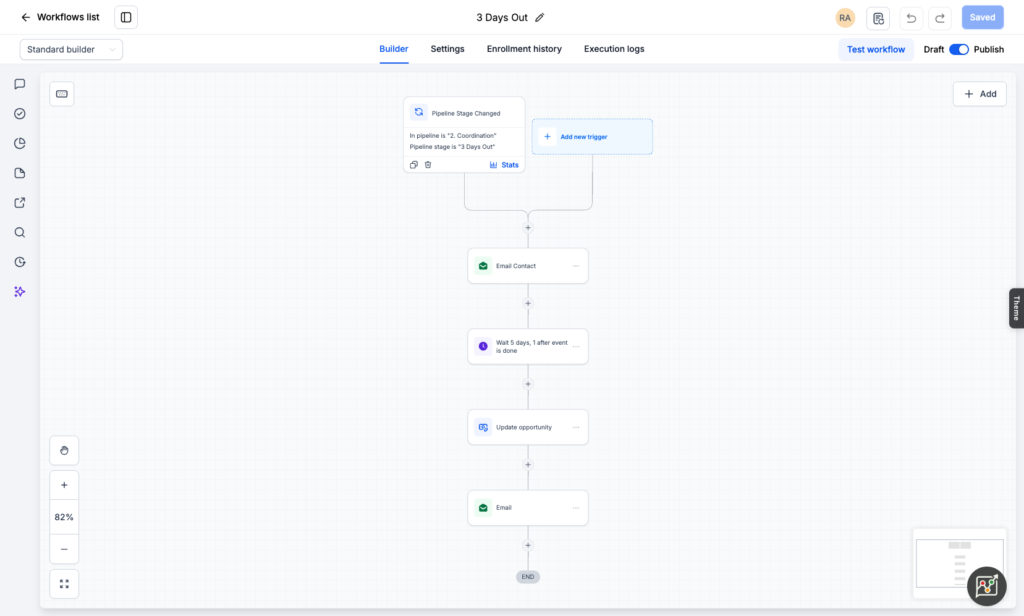
One trigger can send an email, fire off a text, assign a task to a staff member, and update the group’s status in your pipeline. Nobody touches a keyboard, and the group that reaches out at 9 p.m. on a Saturday gets the same follow-up as the one that calls on Tuesday morning.
Trigger-Based Automation
LeadHub lets you set a workflow to start the moment a specific action happens, such as a form submission or a missed call.
Outcome: every lead gets an immediate response, even outside normal business hours.
Email and Text Sequences in One Workflow
A single workflow can combine email workflow automation with SMS and internal tasks in one connected sequence.
Outcome: your team follows one consistent process instead of juggling separate tools for each channel.
Drip and Delay Controls
LeadHub lets you set exact timing between each step, such as sending to a batch of 100 contacts with a one-day interval between sends.
Outcome: leads receive a steady, predictable cadence instead of an overwhelming burst of messages.
AI-Assisted Content Setup
LeadHub uses built-in AI to help draft workflow messages, so building a sequence does not require starting from a blank page.
Outcome: workflows launch faster, even without a dedicated copywriter on staff.
Third-Party Action Support
Workflows can trigger actions outside of email and SMS, including updates to other connected tools and systems your business already uses.
Outcome: your CRM data and your outside tools stay in sync automatically.
Built-In Publishing and Reporting
Every workflow gets published, saved, and tracked inside LeadHub, so your team can see exactly what is currently running.
Outcome: your team always knows what automation is active and how each one performs.
Use Case: How a Retreat Center Could Automate Its Follow-Up
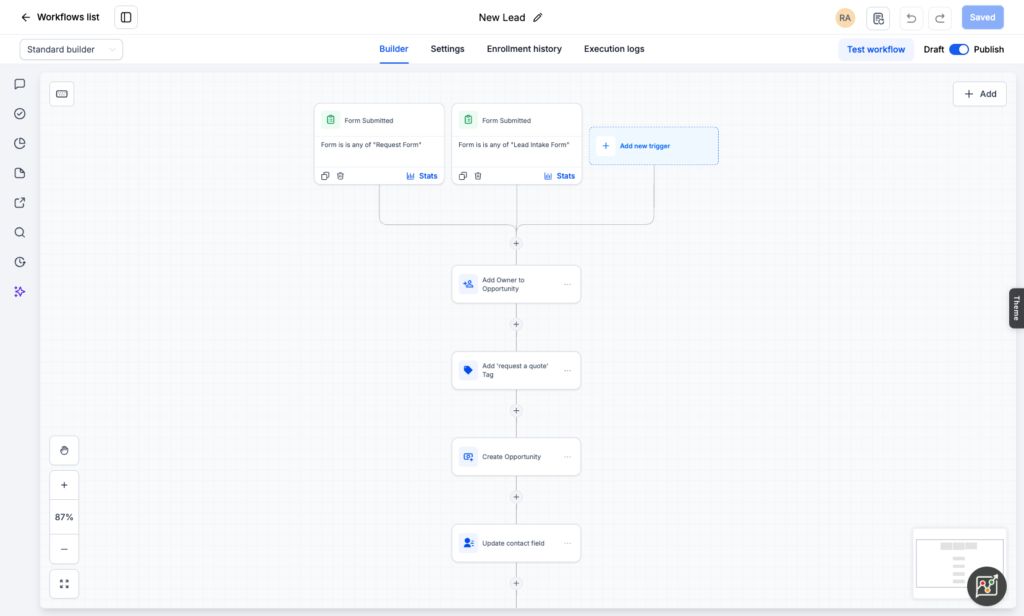
Imagine a Christian retreat center that hears from church groups, youth leaders, and families planning weekend retreats. Right now, a staff member keeps a running list of who needs a follow-up email and who needs a reminder text.
With LeadHub, the retreat center could build one workflow triggered by its inquiry form:
- A welcome email goes out immediately
- If the group hasn’t replied in three days, a text follows up
- Staff get an alert only when an inquiry needs a personal touch
Missed calls and site visits could work the same way. An automated email checks in the next day, and a text follows three days later if nothing changes.
Staff would spend their time planning retreats instead of chasing follow-up. Over time, the center could turn more of the inquiries it already gets into booked weekends without adding admin hours to anyone’s schedule.
Automate Your Follow-Up and Fill More Dates with LeadHub CRM
Groups often compare several camps before they commit. The camp that answers first and keeps in touch has the edge.
If you’re already investing in marketing, don’t let manual follow-up waste it. Build your sequences once in LeadHub and let them run.
See how Automated Workflows could handle your camp’s follow-up in a 15-minute LeadHub demo. No pressure either way.
FAQs
What is workflow automation?
Workflow automation is a system that triggers a sequence of actions, such as emails, texts, or task assignments, automatically based on a lead’s behavior or a set schedule. It removes the need for manual input at each step.
Why is workflow automation important for local service businesses?
Local service businesses often lose leads simply because nobody follows up fast enough. Workflow automation removes that risk by responding the moment a trigger happens, keeping leads engaged while interest is still high.
How does email workflow automation work?
Email workflow automation sends a pre-built sequence of messages once a trigger fires, such as a form submission or a missed appointment. Each message goes out on a set schedule without anyone drafting or sending it manually.
How often should a workflow follow up with a lead?
Most effective workflows start with an immediate response, since qualification odds drop sharply the longer that first contact is delayed. From there, most sequences continue on a set cadence, such as every one to three days, until the lead responds or the sequence reaches its final step.
Can LeadHub manage workflow automation software features like email, SMS, and tasks in one place?
Yes. LeadHub CRM lets you build a single workflow that combines email, SMS, and internal task assignments, with built-in AI assistance available to help draft the content for each step.
